Case Study
Accelerating Quality: Test Automation in PACS
A Page-Object-Model automation framework for a multi-platform PACS viewer, built for scale and regulatory traceability.
70%
Reduction in regression testing time
Web + Desktop
One framework, two PACS viewer platforms
Page Object Model
Modular, maintainable automation architecture
Client & Context
The healthcare industry is undergoing a significant transformation with the integration of
software test automation into medical imaging systems. Our client runs a highly specialized,
multi-platform PACS Viewer built for large hospitals managing immense volumes of medical imaging
data — available in both Web and Desktop versions, with smooth imaging functionality
including effortless scrolling, image analysis, and 3D rendering. Validating that viewer by hand,
across two platforms and every imaging workflow, was no longer sustainable.
The Problem
Manual testing in PACS environments runs into hard limits: complex workflows spanning multiple
imaging modalities and systems, high volumes of heterogeneous medical image data, and repetitive
regression and compliance checks that don't scale with release cadence. PACS (Picture Archiving
and Communication System) software has to keep proving conformance to DICOM, HIPAA, and FDA
requirements on every release — and doing that by hand across a Web viewer and a Desktop
viewer meant slow feedback cycles, human error in repetitive tests, and gaps in coverage.
What We Built
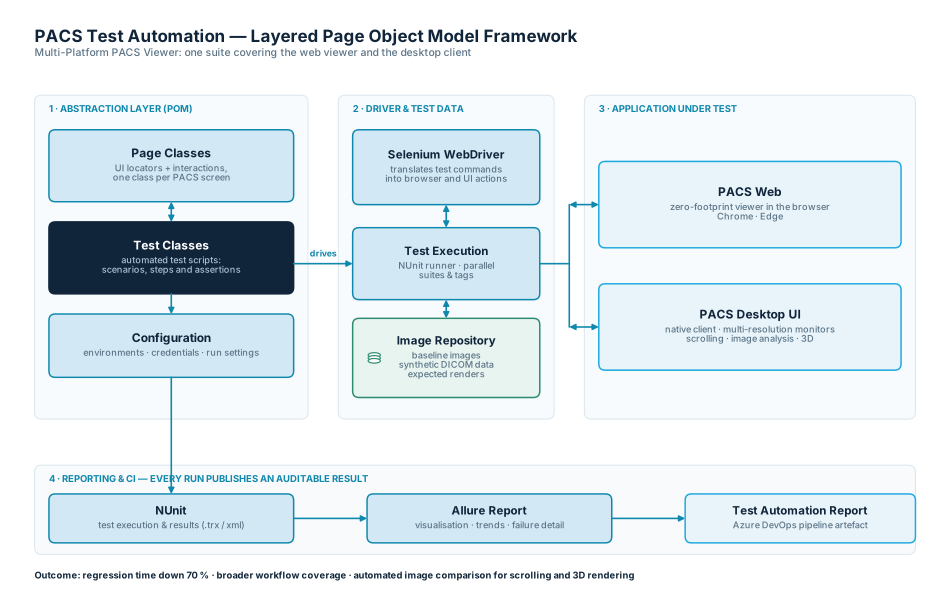
We built a modular, layered test automation framework around the Page Object Model (POM) for the
client's Multi-Platform PACS Viewer:
- Abstraction layer — Page Classes abstract the UI elements and interactions of the PACS application, decoupling test logic from UI details; Test Classes define the actual test scenarios by calling methods on those Page Objects.
- Driver layer — Selenium WebDriver acts as the interface to both target applications, translating automation commands into browser and UI actions.
- Application-under-test layer — covers PACS Web (browser-based) and PACS UI (desktop/native), including multi-resolution monitor scenarios for the desktop viewer.
- Data/resource layer — a centralized image repository provides test-specific DICOM data for every scenario.
- Reporting layer — NUnit drives execution and Allure Report visualizes outcomes for auditable, compliance-ready documentation.
Key Areas Covered
- DICOM compliance testing — file structure, metadata, SOP class conformance, transfer syntaxes, encoding, and compression.
- Imaging workflow automation — simulated modality uploads (CT, MRI, ultrasound), PACS archival/routing/retrieval, and automated validation of image display in diagnostic viewers.
- Integration testing — HL7 message exchange with HIS/RIS, order entry and scheduling, and cross-vendor interoperability.
- Performance and load testing — stress testing under high user load and monitoring latency during simultaneous uploads and retrievals.
- Security and access control testing — RBAC validation, encryption/anonymization checks, and audit logging.
Automation Architecture
The Result
- Reduced regression testing time by 70%.
- Detected critical bugs immediately after deployment.
- Enhanced test coverage across multiple imaging workflows.
- Automated image comparison, validating complex imaging functionality such as scrolling and 3D rendering.
DCMTK
dcm4che
pynetdicom
pydicom
Selenium WebDriver
Robot Framework
Cypress
Squish
JMeter
K6
NUnit
Allure Report
ReportPortal
Azure DevOps
Work with us
Need to trust your releases
as your imaging platform scales?
Tell us about your project. We'll tell you honestly whether and how we can help.