Case Study
Desktop-based Medical Imaging & Reporting Software
From raw video to PACS-connected diagnostic record — without leaving the procedure room.
~500 → 1,500+
Endoscopy systems in the field
6 months
Delivery timeline
5.75 FTE
Cross-functional team
DICOM + HL7
Native, in one codebase
Client & Context
Our client is the Indian arm of a global medical imaging and diagnostic systems manufacturer, with
approximately 500 endoscopy systems already deployed across hospitals and diagnostic centres in
India. To scale toward 1,500+ installations over the next few years, they needed a companion
desktop application to ship with their hardware — one that takes the live endoscopic video
feed from their capture systems and turns it into structured, archived, standards-compliant
diagnostic records. NKORR built that software.
The Problem
The client's imaging systems captured excellent video, but stopped there — there was no
integrated desktop application tying that live feed to the documentation and archiving workflow
their hospital customers actually needed. Left without it, end users typed reports from memory or
hand-annotated prints, saved images to local folders or burned them to CD, and re-keyed patient
details by hand because nothing pulled from a Modality Worklist — so findings rarely flowed
cleanly into the DICOM and HL7 backbone the rest of the hospital ran on. The client needed a
product to ship with its systems: one that captured video, produced structured reports with
embedded images, and spoke DICOM and HL7 natively. Off-the-shelf viewers could not do this —
clinical imaging is live-video-first, and none integrated the clinical order-and-result flow.
Why NKORR
The client needed one partner who could handle clinical video capture and the DICOM and HL7
integration inside a single application — not stitch together three vendors. NKORR was the
only team offering both: a production DICOM stack built on fo-dicom and a hand-built HL7 v2
engine, in one .NET codebase. Having already delivered a comparable medical-imaging product, the
team understood clinical workflows and the standards involved from day one.
What We Built
We delivered a Windows desktop application (.NET 10, WPF) that turns a single workstation in the
procedure room into a complete capture, reporting, and archiving hub for the client's imaging
systems. It pulls live video off the device's video-capture card — via OpenCV, DirectShow,
and a native Media Foundation transcoder — shows it on screen in real time, and lets the
clinician grab snapshots, record clips, and add audio notes mid-procedure. Captured images drop
straight into a structured report built on a DevExpress rich-text editor.
- Full DICOM node — queries the Modality Worklist (MWL) so patient and order details arrive automatically instead of being typed, sends images and reports to PACS by C-STORE, and performs C-ECHO verification against connected DICOM peers.
- Custom HL7 v2 engine — ORM orders in, ORU results out, with a Mirth-friendly listener and template parser wiring the workstation into the hospital information system.
- Finished studies leave as standards-compliant DICOM — or by USB, CD, email, or WhatsApp — with no manual re-entry.
- Clean layered architecture (separate domain, use-case, and adapter layers per module) over a PostgreSQL database with a dedicated schema-upgrade manager.
- Every pull request runs through Bitbucket Pipelines with SonarQube static analysis.
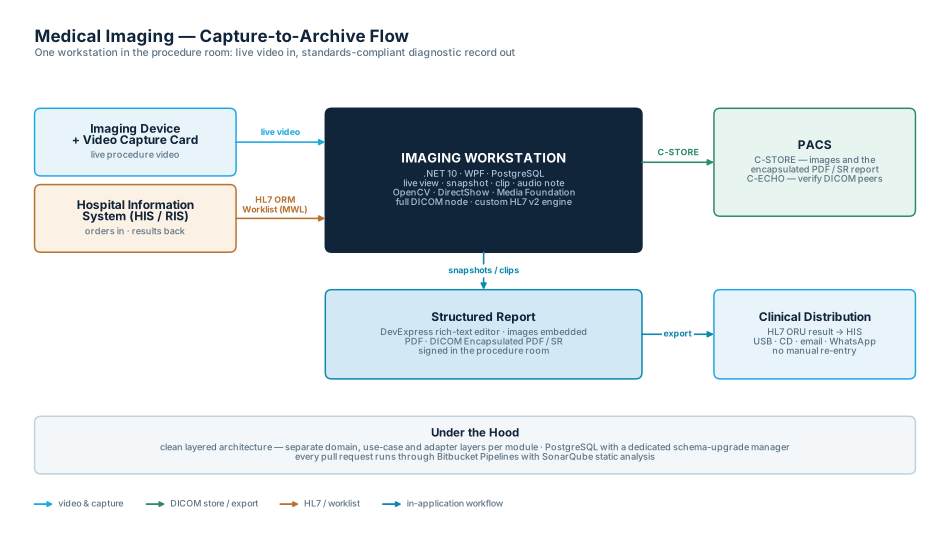
Capture-to-Archive Flow
One workstation ties the imaging device, the hospital's HIS/RIS, and PACS together end to end.
The Result
The client now has a complete desktop product to ship with its imaging systems: one workstation
that runs the entire procedure-to-archive workflow from a single screen. Live video, images, and
the diagnostic report sit in one place, so a study is reported and signed without leaving the
room. Modality Worklist removes the manual demographic entry that causes identity mismatches;
C-STORE and HL7 mean every finished study lands in PACS and flows back to the ordering physician
automatically. Reports go out as standards-compliant DICOM, readable anywhere in the hospital, and
can also reach a patient by USB, CD, email, or WhatsApp.
Team + Timeline
| Role | Count | Duration |
|---|---|---|
| Project Lead | 0.5 | 6 months |
| Technical Architect | 0.25 | 6 months |
| Senior Lead Engineer | 1 | 6 months |
| Software Engineer | 3 | 6 months |
| Test Engineer | 1 | 5 months |
C#
.NET 10
WPF
PostgreSQL
fo-dicom
HL7
OpenCV
DirectShow
Media Foundation
DevExpress
Work with us
Building something similar
for your imaging hardware?
Tell us about your project. We'll tell you honestly whether and how we can help.